CPQ DevKit™ for Oracle
CPQ DevKit™ for Oracle® CPQ Cloud is a Visual Studio Code extension for Oracle CPQ Cloud (BigMachines) development.
It improves day-to-day work on BML and BMQL with formatting, snippets, and project sync workflows.
Highlights
- BML/BMQL editing: snippets, autocomplete helpers, and formatting for
.bml, .json, .xml
- Project sync: download/sync CPQ objects (Functions/BML, Data Tables, Assets, Parts, Products, Pricing, Integrations, and more)
- Navigation: Go to Definition for
util. / commerce. functions and BMQL Data Table references
- Environment management: configuration-driven folder structure and fast environment switching
- Table previews: preview JSON/CSV/XML data as a searchable table
- Action palette: quickly run common DevKit workflows from one menu
- Explorer view: a dedicated CPQ DevKit™ sidebar with environment + common actions
- Tasks: run downloads/deploy/test from the VS Code Tasks UI (
Terminal: Run Task…)
What's new in Release 2.6.0
See the full release notes in CHANGELOG.
Bonus
You can now register to CPQ DevKit™ for free at cpqdevkit.com. CPQ DevKit™ is a website build to augment Oracle® CPQ Cloud system's functionality from Visual Studio Code.
Features
CPQ DevKit™ for Oracle® CPQ Cloud (BigMachines) comes with several great features:
- safe functions with fast autocomplete
- formatter and beautifier for
.bml, .json, .xml
- all bmi system attributes and constants
- safe for loop snippets for
array and jsonarray
- functionality to interact with a
*.bigmachines.com website
- add auto-commit function when receiving new versions of files from the server (only if git is initialized you should use in directory with your project command $ git init).
For questions or concerns about the extention use the Q&A tab or contact us on the CPQ Consultant.
You can also find CPQ Consultant on Linkedin.
How to interact with a *.bigmachines.com domain?
After installation, you should go to the DevKit settings (in Visual Studio Code settings) and add configuration data for your environments, be that dev, test or prod.
Make sure your BigMachines user has below properties:
- is
FullAdmin
- has
User Administrator checkbox checked
- in the
All Access administrator group
Open a new directory where you want to setup the project Visual Studio Code.
📁 Configuration Files
To use CPQ DevKit™ for Oracle, you need to create two configuration files in your project directory:
1. project.config.jsonc - Project Configuration
This file defines your project-specific settings and folder structure. Create this file in your project root:
{
  "apiVersion": "v19", //v17 is the default, any version after v15 is supported
  "tableFormat": "json",
  "folderSettings": {
    "files": "_files",
    "parts": "_parts",
    "tables": "_tables",
    "utilFunctions": "_utils",
    "commerceFunctions": "_commerce",
    "assets": "_assets",
    "pricing": "_pricing",
    "metadata": "_metadata",
    "dictionary": "_dictionary",
    "integrations": "_integrations"
  },
  "fileSettings": {
    "bmlUtilPrefix": "util.",             // use "" if you don't new format changes
    "bmlCommercePrefix": "commerce.",     // use "" if you don't new format changes
    "bmlIncludeMetaTag": "true",          // use "false" if you don't new format changes
    "bmlIncludeTestTag": "true",          // use "false" if you don't new format changes
    "defaultDataFormat": "json"
  }
}
Configuration Options:
apiVersion: Oracle CPQ API version (e.g., "v19", "v17", "v15")tableFormat: Format for downloaded tables ("json" or "csv")folderSettings: Local folder names for different file types:
files: Static files and documentsparts: Part definitions and configurationstables: Data tablesutilFunctions: Utility BML functionscommerceFunctions: Commerce BML functionsassets: Asset management filespricing: Pricing rules and configurationsmetadata: Metadata catalogsdictionary: Translation dictionariesintegrations: Integration configurations
fileSettings:
bmlUtilPrefix: Prefix for utility functions (default: "util.")bmlCommercePrefix: Prefix for commerce functions (default: "commerce.")bmlIncludeMetaTag: Whether to include meta tag in BML files ("true"/"false")bmlIncludeTestTag: Whether to include test tag in BML files ("true"/"false")defaultDataFormat: Default format for data files ("json" or "xml")
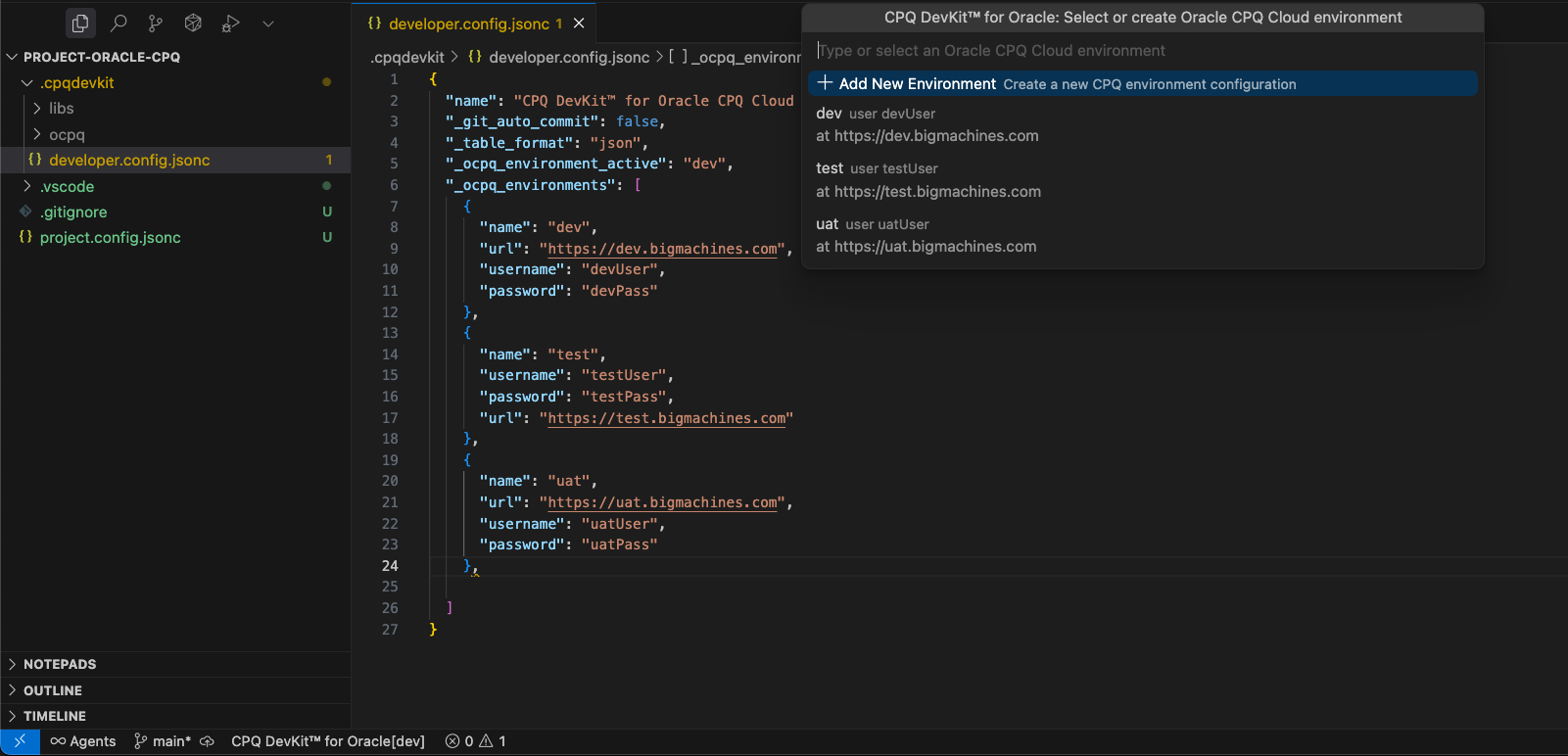
2. .cpqdevkit/developer.config.jsonc - Developer Configuration (keep in .gitignore)
This file contains your personal developer settings and credentials. Create the .cpqdevkit directory and this file:
{
  "name": "CPQ DevKit™ for Oracle CPQ Cloud - developer's secret file",
  "_git_auto_commit": false,
  "_table_format": "json",
  "_ocpq_environment_active": "dev",
  "_ocpq_environments": [
    {
      "name": "dev",
      "url": "https://<subdomain-dev>.bigmachines.com",
      "username": "<username>",
      "password": "<password>"
    },
    {
      "name": "uat",
      "url": "https://<subdomain-uat>.bigmachines.com",
      "username": "<username>",
      "password": "<password>"
    }
  ]
}
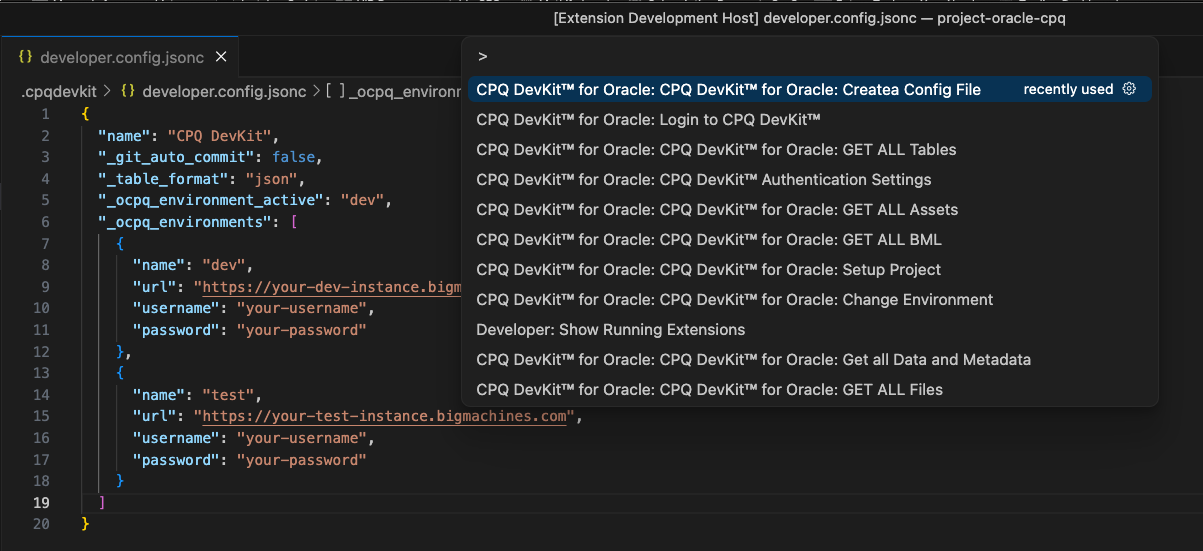
To open the list of available commands, you must right-click on the project explorer panel and select the DevKit menu or open the list of all available commands (CTRL+SHIFT+P) and type DevKit into the search bar.
Complete List of Commands
🔐 Authentication Commands
Login to CPQ DevKit™ - Authenticate with CPQ DevKit™ servicesLogout from CPQ DevKit™ - Sign out from CPQ DevKit™ servicesCPQ DevKit™ Authentication Settings - Open authentication configuration
⚙️ Setup & Configuration
CPQ DevKit™: Actions - Open the action palette (quick access to common workflows)CPQ DevKit™ for Oracle: Setup Project - Initialize project configurationCPQ DevKit™ for Oracle: Create Config File - Save all project configurationsCPQ DevKit™ for Oracle: Change Environment - Switch between environmentsCPQ DevKit™: Open Config Files - Open project.config.jsonc and .cpqdevkit/developer.config.jsoncCPQ DevKit™: Diagnose Workspace - Validate configs and active environment setup
🧩 BML Scaffolding
CPQ DevKit™: Create BML Function - Create a new util.* / commerce.* BML file in the correct folder
📥 Download Commands
CPQ DevKit™ for Oracle: Get all Data and Metadata - Download complete data and metadata catalogCPQ DevKit™ for Oracle: GET ALL Files - Download all files from serverCPQ DevKit™ for Oracle: GET ALL Assets - Download all assets from serverCPQ DevKit™ for Oracle: GET ALL Parts - Download all parts from serverCPQ DevKit™ for Oracle: GET ALL BML - Download all BML functions from serverCPQ DevKit™ for Oracle: GET ALL Tables - Download all data tables from serverCPQ DevKit™ for Oracle: GET ALL Shopping Carts - Download all shopping cart dataCPQ DevKit™ for Oracle: GET ALL Product Catalog - Download complete product catalogCPQ DevKit™ for Oracle: GET Integrations - Download all integrations (Vendors, Settings, Types, Commerce, Product Families)CPQ DevKit™ for Oracle: GET ONE Table - Download a specific data table
🚀 Deploy & Development Commands
CPQ DevKit™ for Oracle: DEPLOY Functions - Deploy BML functions to serverCPQ DevKit™ for Oracle: SAVE Functions - Save BML functions to serverCPQ DevKit™ for Oracle: TEST Functions - Test BML functions on serverCPQ DevKit™ for Oracle: VALIDATE Functions - Validate BML functions on server
🛠️ Utility Commands
CPQ DevKit™: View as Table - Preview JSON/CSV/XML as a searchable tableCPQ DevKit™: Convert to JSON - Convert XML/CSV files to JSON formatCPQ DevKit™: Convert to XML - Convert JSON/CSV files to XML formatCPQ DevKit™: Convert to CSV - Convert JSON/XML files to CSV format
Legal
Oracle and Java are registered trademarks of Oracle and/or its affiliates. Other names may be trademarks of their respective owners.
Node.js is a trademark of Joyent, Inc. We are not endorsed by or affiliated with Joyent.

